Fill USCIS Forms Instantly — Free, Private, and 100% Online
Complete any immigration form in minutes, right from your browser.
No sign-ups, no data stored, no lawyer required.
The easiset way to fill Immigration forms
Prepare official USCIS and visa PDFs in your browser. No Adobe, no signup, and no timeouts
A free, open-source alternative to immigration tools that cost hundreds
Immigration paperwork is already stressful. Paying hundreds of dollars just to prepare a form should not be another barrier. Fillvisa keeps core form filling free, private, open source, and accessible while making official PDFs easier to complete from any device.
Guided autosave
Never lose your progress. Fillvisa saves every change automatically so you can pause anytime and resume right where you left off - no sessions, no timeouts.
Privacy-first design
Your data never leaves your browser. Fillvisa runs on your device - no cloud sync, no accounts, and no form uploads.
Free for immigrants
No subscriptions, no hidden form limits, and no paywall before download. Fillvisa exists to make immigration paperwork more accessible.
Open-source transparency
Fillvisa OS lets anyone inspect, fork, and self-host the public form tools, so trust does not depend on marketing alone.
Popular Forms
See all →Immigration forms should not feel this hard
From address changes to green card renewals and employment-based petitions, too much of immigration still depends on PDFs that do not save reliably, break on mobile, and push people toward paid tools for basic form preparation.
Some fields just do not work
Half the boxes let you type, half do not. Depending on your browser or device, entire sections of the form can remain uneditable - forcing you to download Adobe Acrobat.
Even with Adobe, it can still break
Even inside Acrobat, USCIS forms glitch, reset fields, and break accessibility features - turning a simple update into hours of trial and error.
What Fillvisa makes possible
Prepare forms without special software
No downloads, no Adobe Acrobat. Open a guided form in your browser, fill your details, and keep control of the final PDF.
Keep sensitive data on your device
Fillvisa automatically saves your responses locally so you can pick up exactly where you left off - no account or upload needed.
Download an official-format PDF
Once complete, download a perfectly formatted PDF matching the official USCIS layout - ready to print or submit.
Three steps from start to finish
Choose a supported form, answer guided questions, and download a completed official-format PDF.
Fill Out Your Information
Answer simple, guided questions in your browser. Fillvisa auto-saves as you type - no lost progress, no software required.
Review & Download
Preview your responses instantly and download a completed, USCIS-formatted PDF that matches the official layout.
Print or Mail Your Form
Print the filled form, sign it, and mail it to the USCIS address listed for your case - or keep a digital copy for your records.
Real-time sync
Your progress is saved automatically in your browser as you work.
Dark mode
Toggle between light and dark for comfortable viewing anytime.
Works on Any Device
Fill out your application smoothly on phone, tablet, or laptop.
Built-in Signature Pad
Sign directly inside your browser with a smooth, built-in signature pad - no printing, scanning, or extra tools needed.
Smart Form Checks
Same as the official form, but with built-in validation to catch mistakes instantly
Inspect the code. Run it yourself.
Fillvisa OS is the open-source edition of Fillvisa, giving you full
access to the source code and the freedom to run it on your own infrastructure.
Inspect how it works, customize it to your needs, download the project, or self-host your own copy from GitHub.
Trusted by people trying to move forward
People come to Fillvisa for the same reasons: it is free, private, and calmer than wrestling with PDFs or paying hundreds before they know what they need.
"I expected another paywall, but Fillvisa let me finish and download my form for free. That mattered a lot."
Naveen S.
Family-based applicant"I used it for my parents' applications. The autosave made it much less stressful because we could pause and come back later."
Isha M.
New York, USA"I liked that I did not have to create an account or upload private immigration details. It felt simple and safer."
Swati S.
Travel visa applicant"The official PDF kept fighting me. Fillvisa gave me a cleaner way to answer everything and review before printing."
Adnan R.
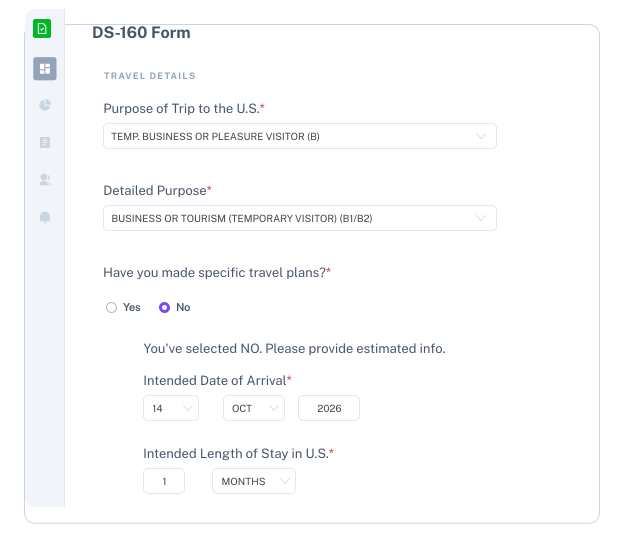
DS-160 user"Other tools wanted hundreds of dollars before I even understood the process. Fillvisa helped me get organized first."
Anirudh K.
Green card renewal"I could explain the form to my spouse without jumping between PDF fields. The browser flow made the whole thing clearer."
Arjun H.
Family immigration userImmigration made easier across more pathways
Behind every form is a person, a family, an employer, or a future being planned. Fillvisa started with the forms people need most, and our vision is to make reliable, privacy-first form tools available across family, travel, citizenship, humanitarian, and employment-based immigration.
Building immigration workflows for professionals too?
Fillvisa stays free for immigrants. Fillvisa Plus helps professionals handle complex packets, client collaboration, and expanding employment-based workflows from EB-1 through EB-5.
Recent Changelog
Features and improvements we've shipped.
Recoding Immigration
Insights on immigration tech, automation, and better digital bureaucracy.