Fill Form I-90 Online — Free, Smart, and Ready to Download
Complete Form I-90 right in your browser. It’s a free, smart web form that auto-saves and generates your filled USCIS PDF in one click.
No more broken PDFs
Skip the hassle of downloading, installing, and reopening PDF forms that never save. Fillvisa lets you complete I-90 right in your browser — auto-saved, frustration-free, and always ready to resume.
Auto-save
Never lose your progress. Fillvisa saves every change automatically so you can pause anytime and resume right where you left off — no sessions, no timeouts.
Local-only Storage
Your data never leaves your browser. Fillvisa runs entirely on your device — no cloud sync, no accounts, and no tracking. 100% private and secure.
100% Free
Every feature is completely free — no sign-ups, or hidden limits. Fillvisa is built to make immigration form automation accessible to everyone.
Automated Form Filling
Complete your I-90 once and get a perfectly formatted, ready-to-download USCIS PDF — no manual edits, no extra tools required.
Changing Your Address Shouldn’t Be This Complicated
The official I-90 form still relies on outdated PDFs that don’t save, is semi-fillable, and don’t make sense on mobile.
Your Progress Doesn’t Always Save
The official I-90 PDF doesn’t always store your data unless you open it in the right version of Adobe on a desktop — lot of users lose everything the moment they close the file.
Some Fields Just Don’t Work
Half the boxes let you type, half don’t. Depending on your browser or device, entire sections of the I-90 can freeze or stay blank — forcing you to print it out and fill by hand like it’s 1998.
With Fillvisa
Fill directly in your browser
No downloads, no Adobe Acrobat. Just open the I-90 form in your browser, fill your details, and finish in minutes.
Auto-save always
Fillvisa automatically saves your responses locally so you can pick up exactly where you left off — no account needed.
Ready USCIS PDF instantly
Once complete, download a perfectly formatted I-90 PDF matching the official USCIS layout — ready to print or submit.
Three Steps From Start To Finish
Update your USCIS address online in minutes — no downloads, no third-party software, no frustration.
Fill Out Your Information
Answer simple, guided questions in your browser. Fillvisa auto-saves as you type — no lost progress, no software required.
Review & Download
Visit Preview your responses instantly and download a completed, USCIS-formatted I-90 PDF that matches the official layout.
Print or Mail Your Form
Print the filled form, sign it, and mail it to the USCIS address listed for your case — or keep a digital copy for your records.
Watch Our Process in Action
See exactly how we simplify your I-90 experience
Effortless Form Filling
- Real Time Auto-save: Every response is saved instantly, ensuring you never lose progress—even in sections like travel or work history that require detailed information.
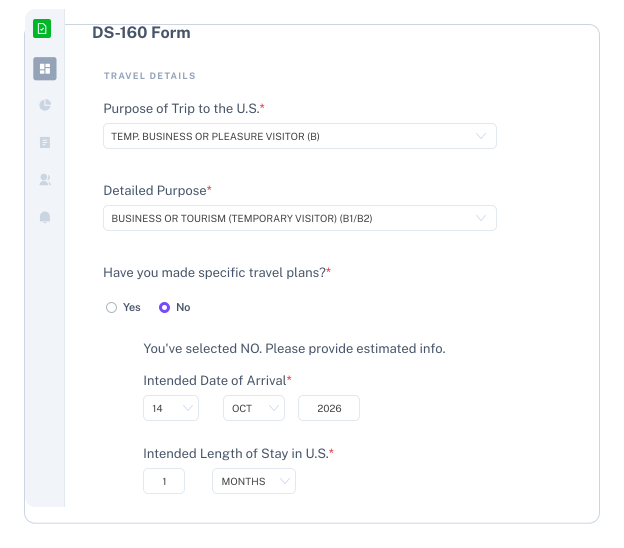
- Simulates the Real I-90: Our form replicates G-1145’s layout and questions, letting you jump between sections freely — no locks, no sign‑ups, just smooth navigation.
- Privacy‑First: Your data stays in your browser — never stored, never shared, always under your control.
No Adobe. No Installs. Just Your Browser.
- Skip the Software: Forget downloading bulky tools. Fillvisa lets you complete Form I-90 directly in your browser — with auto-save and instant PDF export.
- Safe and Local: Your data stays private on your device. Nothing is uploaded, tracked, or stored online.
- Official Layout, Simplified: Every field matches the real USCIS form, only easier to fill and review.
Real-time sync
Your progress is saved automatically in your browser as you work.
Dark mode
Toggle between light and dark for comfortable viewing anytime.
Works on Any Device
Fill out your application smoothly on phone, tablet, or laptop.
Reuse for Group
Use one completed form as a base for multiple applications in your group.
Smart Form Checks
Same as the official form, but with built-in validation to catch mistakes instantly
😄 Fewer meltdowns, more visas — our users are happy
“I was dreading my US visa application because the DS-160 site is… well, the DS-160 site. Fillvisa made it painless.”
Naveen Shetty
Delhi, India“I used it for my parents’ applications. We finished both forms in less than half the time.”
Isha M.
New York, U.S.A“Honestly didn’t expect much from a free tool, but Fillvisa made my US form so much faster to complete. Kudos!"
Swati Saxena
Pune, India“I tried it for my DS-160, and everything went smoothly. No more copy-pasting my address 5 times — it just filled it in everywhere.”
Adnan
Dubai, UAE“I HATE filling USA visa application. Fillvisa saved my sanity. Thank you for building this”
Anirudh Khatry
Mumbai, India“The best part was that I didn’t have to create an account. I value my privacy, so that’s a huge plus.”
Arjun Haridas
Mumbai, India✈️ Immigration made easy
Behind every form is a person - a story, a move, a dream. Fillvisa helps you complete U.S. immigration forms easily and independently, so you can focus on building your new life, not battling paperwork.
👋 Are you an Immigration Professional?
Still juggling PDFS, spreadsheets and email?
Try Fillvisa Plus - collaborate with your clients, and fill immigration forms 3×
faster